All posts by admin

CodeRage Session – Keeping Data Secure While Delivering Self-Service Analytics

As part of CodeRage 2025, I recently ran a session titled
“Keeping Data Secure While Delivering Self-Service Analytics”, focused squarely on a challenge many software developers face today:

How do you embed powerful analytics into your application without compromising security, auditability, or compliance?

If you missed the live session—or want to revisit the demos—the full replay is now available:

▶️ Watch the session replay
https://www.youtube.com/live/5Wdf0BWf49I?si=B7SVRDADT8SC4jXe&t=518


What the Session Covered

The talk was aimed at application developers and ISVs who are embedding analytics into their own products or internal systems. We explored how Yellowfin enables:

🔐 Strong Security by Design

  • Role-based access control down to reports, dashboards, and data
  • Secure embedding models that respect your application’s authentication
  • Fine-grained permissions that align with real-world user roles

🧾 Deep Auditing & Event Tracking

A major focus of the session was auditing, which is becoming increasingly critical as regulations tighten.

Yellowfin provides built-in auditing that allows you to track:

  • Who accessed analytics content
  • What they viewed
  • When it was accessed
  • Whether data was exported or shared

This level of visibility is particularly relevant when aligning analytics with modern compliance and security frameworks.

For developers, this means you can embed analytics while still giving security teams, compliance officers, and auditors the evidence they need.

🧩 Versatile Embedding for Real Applications

We also looked at how flexible Yellowfin is when embedding into existing applications:

  • Embed reports and dashboards directly into your UI
  • Control context, filters, and user experience from your own code
  • Maintain a consistent look and feel with your application

This isn’t analytics bolted on as an afterthought—it’s analytics that behaves like a native part of your product.


Yellowfin Developer Sandbox – Try It Yourself

One of the key messages from the session was: don’t just watch—build.

Yellowfin offers a free Developer Sandbox that gives you:

  • A fully working Yellowfin environment
  • APIs for embedding and automation
  • Sample data and configuration
  • A safe space to experiment without risk

🎥 Quick overview of the Yellowfin Developer Sandbox
https://www.youtube.com/watch?v=uLTt6bKOezU

The sandbox is ideal if you want to explore how Yellowfin fits into your existing architecture. With prebuilt demo examples, you don’t need to be a Yellowfin expert, you just need to know how to call the API!


Download the Code & Start Embedding

Alongside the sandbox, I also shared code samples during the session to demonstrate how developers can embed single signon into the applications rapidly

If you’re serious about embedding analytics, the best next step is to:

  1. Sign up for the Yellowfin Developer Sandbox
  2. Download the code samples (all the details are in the welcome email)
  3. Experiment with embedding analytics into your own application

You’ll quickly see how much control you retain—both from a UX and a security perspective.


Why This Matters Now

With growing pressure around data security, governance, and compliance, analytics can no longer be treated as a black box.

For developers, the challenge is delivering:

  • Self-service insights users love
    without
  • Losing control over data access and usage

Yellowfin’s combination of strong auditing, robust security, and flexible embedding makes it a compelling choice for modern application development—especially for ISVs and teams building data-driven products.
Installing Help and Samples for RAD Studio

The Help and Samples (for both Delphi and C++) are very useful when Programming as they provide quick reference and examples of how to use different language and component features.

If you are using the RAD Studio IDE and find that F1 is not opening up the help files, then the most likely answer is that the Help installation was skipped during the initial install.

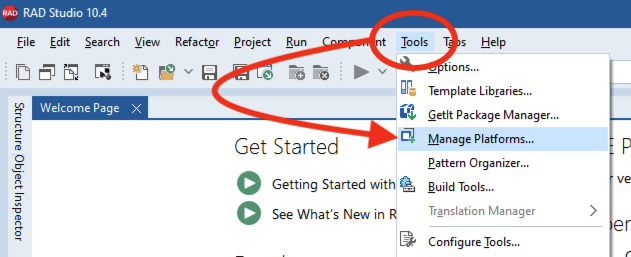
To check (and install if missing) go to Tools > Manage Platforms

This dialog allows you to install additional platforms, but also (under Additional Options) manage the installation of Help and Samples.

Simply, tick the box for Samples and Help and then Apply, and you should then be ready to use F1 help in the IDE.

Auto Inc Fields in RAD Server with InterBase

How to create Auto Incremental Fields in RAD Server with InterBase, FireDAC and TEMSDataSetResource

One key feature when asking a remote server to add a record is to get the new record ID value returned. Thankfully this is easily achieved with InterBase and FireDAC via RAD Server with TEMSDataSetResource

InterBase has a concept of Generators. These provide a unique sequential integer value that can be used to provide a primary key field value. You can create up to 32,767 Generators in an InterBase database, but typically you would create one for the database or create and name one for use per table.

FireDAC Query UpdateOptions AutoInc

Part of the FireDAC framework is the ability to treat database fields as Auto-Incremental Fields. For Databases that do not have an AutoIncremental field data type, you can set the UpdateOptions properties to define the Generator and key fields.

Continue reading Auto Inc Fields in RAD Server with InterBase

InterBase ToGo Android Update

InterBase ToGo Update for Android

Following an update to OpenSSL to address some identified vulnerabilities, Google has stopped allowing submission of applications that contain certain versions of OpenSSL libraries.

While InterBase ToGo and IBLite are not affected by the vulnerabilities identified, the current build that is shipped with RAD Studio for Android is being stopped from deploying to the Play Store. To get around this issue, please download the latest build for InterBase ToGo and replace the .a file in your local deployment files.

While tested on 10.1 Berlin, this download should work for any RAD Studio customer who’s product shipped contained InterBase XE7 (XE7, XE8, 10.0 Seattle and 10.1 Berlin).

Download the latest Android InterBase ToGo from Code Central

http://cc.embarcadero.com/item/30630

Where to put the file?

The InterBase ToGo library for IBLite and InterBase ToGo is the same file. This is typically found at

  • C:\Users\Public\Documents\Embarcadero\Interbase\redist\InterBaseXE7\android

You may also need to check for

    • C:\Program Files (x86)\Embarcadero\Studio\18.0\lib\android\Debug\
    • C:\Program Files (x86)\Embarcadero\Studio\18.0\lib\android\Release\

DocWiki notes

A few more notes about the reported case on this are available on DocWiki

http://docwiki.embarcadero.com/PlatformStatus/en/Main_Page#Hotfix_for_InterBase_on_Android

LiveBindings for VCL Developers – Webinar!

LiveBindings for VCL Developers [Webinar]

Visual LiveBindings is a technology that allows you to bind your data and objects (model) to the UI making. While LiveBindings is a key part of FireMonkey development, it is often overlooked by VCL developers.

A while ago I started a series of blogs on LiveBindings and how to use them with existing VCL applications. Covering seven blog posts, I looked at

  1. LiveBinding to DataSets
  2. LiveBinding to Objects
  3. Creating LiveBindings via Code
  4. Master Detail relationships (and objects as properties)
  5. Advanced Master Detail Relationships
  6. Mashing up Master Detail on different sources
  7. Helpful classes for LiveBindings

Following a high amount of demand and questions, you now have you chance to see me present live on this topic and ask your LiveBindings questions. Join me on Wednesday 31st August at 10am GMT.

Register now via community.embarcadero.com

The webinar will be followed by the live Q&A session.